Introduction
We moved the desktop to the cloud. For the most part we did not move the data with it, and that was the right call — but it left a gap that a lot of organisations are still papering over with copies.
A Windows 365 Cloud PC is a genuinely good end-user experience. It is also, by default, an island. Out of the box the Cloud PC sits on the Microsoft Hosted Network, which means its network interface lives in a Microsoft-managed subscription with no line of sight into your virtual networks. Anything private — an Azure NetApp Files volume, a domain controller, a line-of-business application on a spoke VNet — simply is not there. Users notice this the first time they try to open the 40 TiB project share and find it does not exist any more.
The usual response is to copy. Sync a subset down to OneDrive. Stage a working set onto the Cloud PC’s disk, which on a typical SKU is measured in a couple of hundred gigabytes and was never intended to hold a dataset. Stand up a jump box. Publish an app. Each of these works, and each of them creates a second copy of something you were previously able to govern in one place.
There is a better answer, and it has been sitting in the Intune admin centre the whole time: the Azure Network Connection.
Why this matters more now than it did two years ago
The data gravity argument has always been true, but it used to be an infrastructure argument. Large datasets are expensive and slow to move, so you put compute next to them rather than dragging bytes across the network. Fine. Storage architects have been saying it for a decade and everyone nodded politely.
What changed is who needs the data.
The interesting work now happening on knowledge workers’ desktops involves large unstructured datasets that were previously the exclusive concern of a batch job. An analyst pointing a local Python environment at a few hundred gigabytes of parquet. A researcher running an embedding pass over a document corpus before it goes anywhere near a vector index. A designer opening CAD assemblies that are being consumed in parallel by a rendering farm. A clinical team working with imaging data that a model is also being fine-tuned on. Copilot and its equivalents make this worse, not better, because the value of an AI tool is proportional to the amount of relevant data you can put in front of it, and people will happily put a great deal in front of it if you let them.
So the same dataset now has two very different consumers: a GPU tier that wants NFS and parallelism, and a human tier that wants a mapped drive and Explorer. If those two consumers cannot reach the same storage, you end up with two copies. Then three, because someone made a working copy. And now your lineage is fiction, your ransomware blast radius has trebled, your capacity spend has doubled, and the copy the model was trained on is four days behind the copy the auditors are looking at.
Facilitating access to data in place is not a performance optimisation. It is a governance position. One authoritative copy, one set of ACLs, one snapshot schedule, one replication relationship — and as many consumers as you like, each arriving over whichever protocol suits them.
This is where Azure NetApp Files occupies ground nothing else in Azure does. It is the only file storage service in Azure that delivers genuine dual-protocol volumes — the same volume, the same files, presented over SMB3 to a Windows client and over NFSv3 or NFSv4.1 to a Linux client at the same time, with a shared security style, a common identity mapping between the two worlds, and one set of snapshots underneath.
The contrast is worth stating plainly, because “supports both protocols” and “supports both protocols on the same data” are very different claims. Azure Files supports SMB and NFS, but not on the same share — you can put an SMB share and an NFS share in the same storage account, and that is as close as it gets. NFS shares on Azure Files are not supported for Windows clients at all. Blob and ADLS Gen2 offer NFS 3.0 but no SMB. Azure Managed Lustre is a parallel filesystem for the training tier and was never intended to be a mapped drive. Every one of those options forces you back to two copies the moment two protocols are involved. (NetApp’s Cloud Volumes ONTAP does multiprotocol too, but as a self-managed IaaS deployment rather than a first-party Azure service — a different operating model with a different bill.)
So the analyst’s Z: and the training job’s /mnt/corpus can be the same bytes. The only thing missing is a route from the desktop.
Just one more thing. Another capability that aligns well with this architecture is the Azure NetApp Files Object REST API. While Azure NetApp Files is typically associated with high-performance NFS and SMB access, the Object REST API exposes the same underlying data through an S3-compatible interface without requiring it to be copied into a separate object storage platform. This allows analytics, AI and data engineering services that natively understand S3 APIs to work directly against data already stored on Azure NetApp Files, eliminating duplicate datasets, reducing operational complexity and maintaining a single authoritative source of truth. Much like using Azure Network Connections to provide Cloud PCs with direct access to enterprise datasets, the Object REST API helps organisations bring applications to the data rather than moving the data to the applications, improving governance, reducing storage costs and simplifying data lineage.
For a deeper look at the Azure NetApp Files Object REST API and its analytics use cases, have a look at this link: Getting Insights from Azure NetApp Files with the Object REST API
The mechanism: what the Azure Network Connection actually does
Windows 365 Enterprise gives you two network deployment models.
With the Microsoft Hosted Network, Microsoft handles addressing, routing and egress. It is simple, it is fast to deploy, and it costs you no networking effort at all. It also means the Cloud PC has no presence in your address space.
With an Azure Network Connection (ANC), Windows 365 injects a virtual network interface into a subnet in a VNet that you own, in your subscription. This is the important detail and it is worth being precise about: the Cloud PC virtual machine still runs in Microsoft’s subscription. What lands in your VNet is the NIC. From a routing perspective that is enough — the Cloud PC now has an address in your address space, obeys your route tables, resolves against your DNS servers, and is subject to your NSGs.
Azure NetApp Files, meanwhile, is a private service. Volumes live in a subnet delegated to Microsoft.NetApp/volumes and there is no public endpoint. You reach them from within a connected virtual network, from a peered VNet, or from on-premises across a VPN or ExpressRoute gateway. No internet, no service endpoint, no exceptions.
Put those two facts side by side and the solution states itself. Give the Cloud PC an interface in a VNet that can reach the delegated subnet, and the volume becomes a mapped drive.
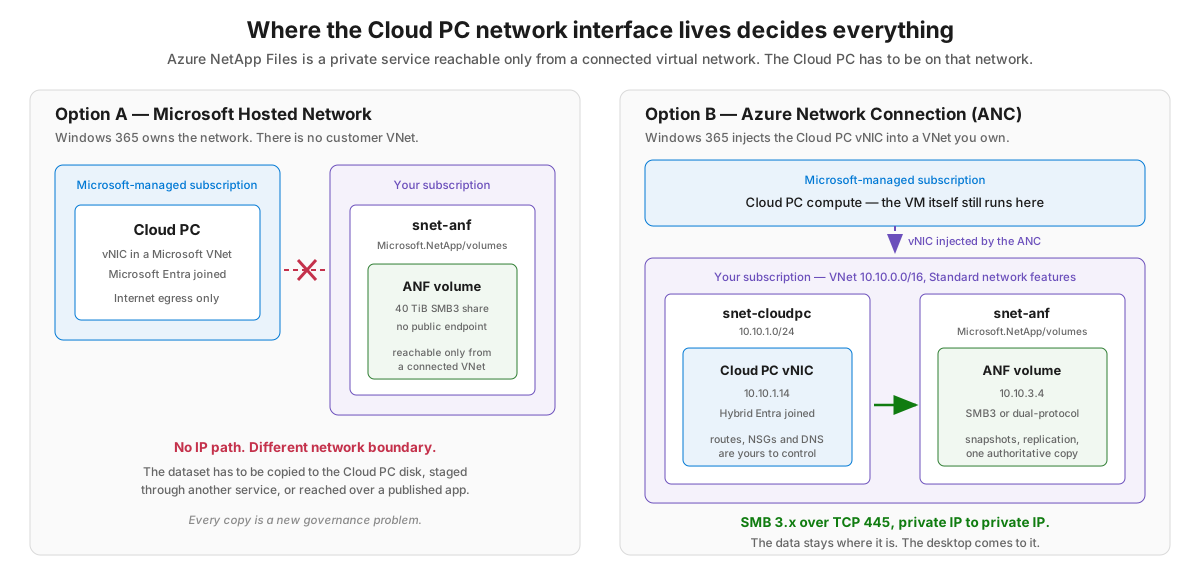
Two caveats before anyone gets carried away. ANC is a Windows 365 Enterprise and Frontline capability — Windows 365 Business is Microsoft-hosted only. And choosing ANC moves network ownership onto your team: addressing, DNS, routing, NSGs, firewalls, capacity, change control. Microsoft’s own guidance is fairly blunt that the hosted network is the better default and ANC should be used for the subset of users who genuinely need line of sight to private resources. That is a reasonable position. Data-heavy users are exactly that subset.
The architecture
Here is what a working deployment looks like end to end.
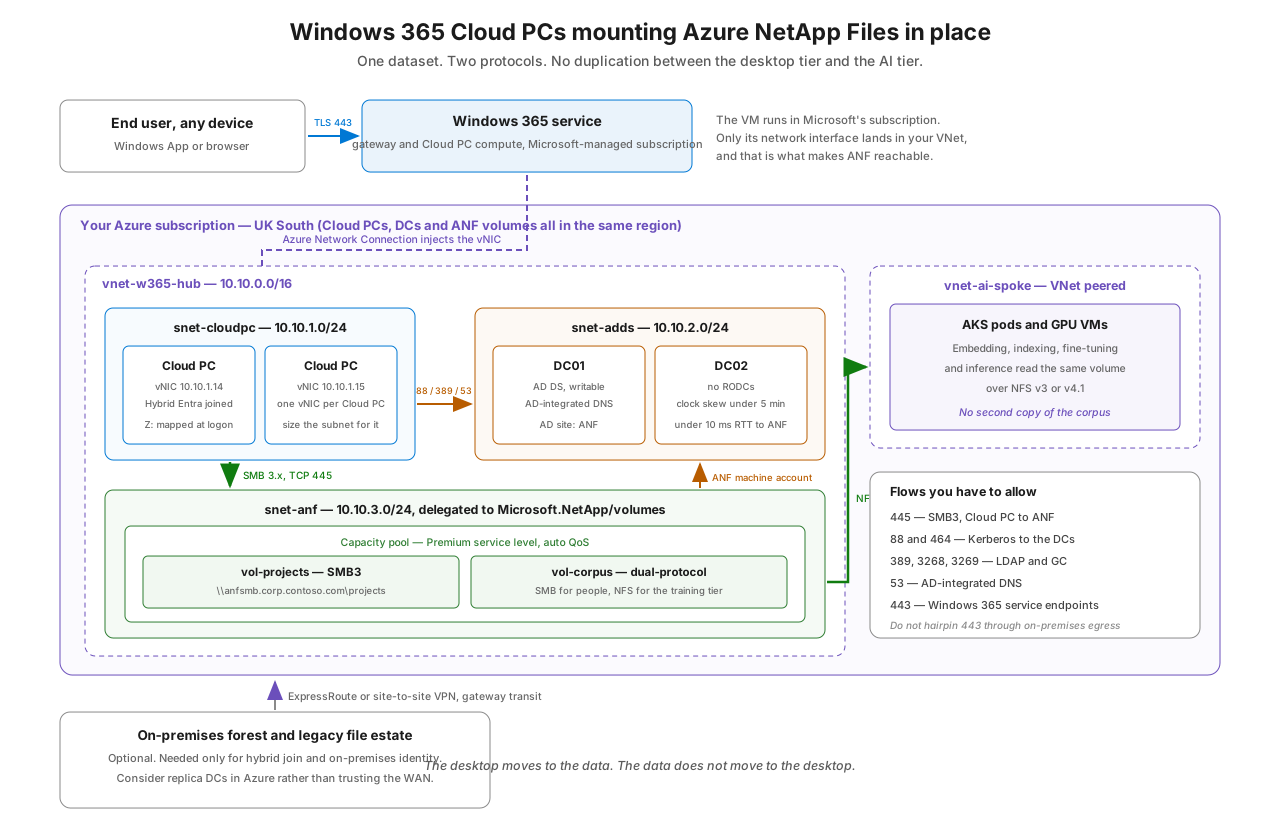
A few design points embedded in that diagram that are worth pulling out.
Everything in one region. The ANC VNet must be in a supported region, and it should be the region closest to your users. Your ANF volumes should be in the same region, and so should the domain controllers that both the Cloud PCs and ANF depend on. Cross-region SMB is not a plan.
Three subnets, one of which is special. The Cloud PC subnet needs an address per Cloud PC with headroom for growth, since resizing later is not free. The AD DS subnet holds writable domain controllers. The ANF subnet is delegated to Microsoft.NetApp/volumes, can only be delegated once per VNet, cannot host anything else, and cannot have its mask changed after creation. A /28 gives you eleven usable addresses, which sounds like enough right up until it is not; /26 or /24 is the sane default and SAP-scale estates want /23.
Standard network features, and no longer a choice. Standard network features give you NSGs and user-defined routes on the delegated subnet, higher IP limits, global VNet peering, and Virtual WAN support. Basic gives you none of that. As of July 2026 Microsoft has stopped offering Basic for new or modified volumes anyway, so this decision has been made for you — but if you are inheriting an older estate, check before you plan the topology, because Basic will not survive contact with global peering.
The AI tier hangs off the same volume. Peer a spoke, put your AKS nodes or GPU VMs in it, and mount the dual-protocol volume over NFS. The desktop reads over SMB, the training job reads over NFS, and there is exactly one copy of the corpus. No other Azure file service will let you draw that diagram. This is the entire point of the exercise.
Identity, which is where most of these projects go sideways
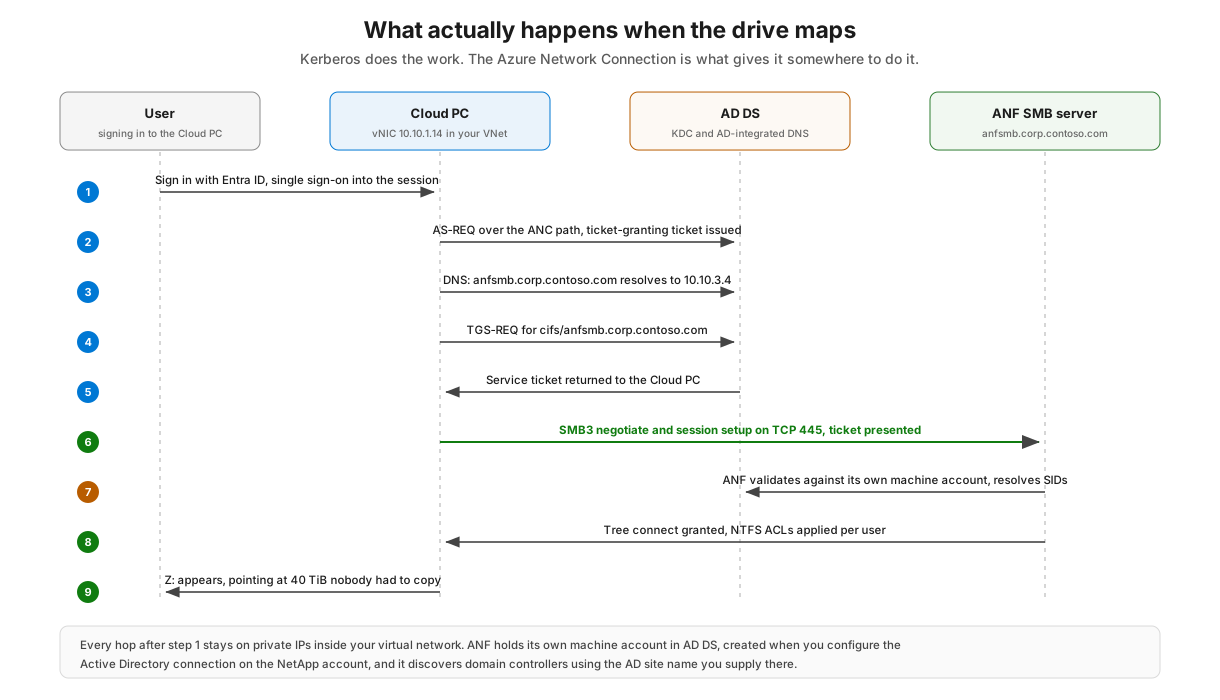
Networking is the easy half. The part that catches people out is authentication, and it catches them out because Windows 365 and Azure NetApp Files have different opinions about what identity means.
Azure NetApp Files SMB volumes authenticate against a real Kerberos realm. You configure an Active Directory connection on the NetApp account — one per account — and ANF creates a machine account in that domain and joins itself. Supported identity sources per the current documentation are on-premises or IaaS Active Directory Domain Services, or Microsoft Entra Domain Services, which is a managed AD DS domain synchronised from your tenant. SMB authentication is Kerberos or NTLMv2; NTLMv1 and LanManager are disabled.
Note what is not in that list. A Cloud PC that is Microsoft Entra joined and nothing else has no domain credentials to present. Entra Kerberos support for SMB has been moving quickly across the Azure storage portfolio, so it is worth re-reading the ANF documentation before you commit to a design — but as things stand, the practical position is:
| Your identity estate | ANC join type | ANF AD connection | Verdict |
|---|---|---|---|
| On-premises AD DS, synced to Entra ID | Hybrid Microsoft Entra join | AD DS (replica DCs in the ANC VNet) | The well-trodden path |
| No on-premises AD, cloud-first tenant | Hybrid Microsoft Entra join | Microsoft Entra Domain Services | Works, but you are running a domain you hoped to avoid |
| Entra-only, no domain anywhere | Microsoft Entra join | Not possible | Reconsider, or reconsider the storage service |
That last row deserves honesty rather than salesmanship. If you are genuinely Entra-only with no domain and no appetite for one, and the desktop is the only consumer of the data, Azure Files with Entra Kerberos is a more natural fit and you should use it. Azure NetApp Files earns its place when you need sub-millisecond latency, tens or hundreds of TiB in a single namespace, application-consistent snapshots taken in seconds regardless of volume size, cross-region replication — or dual-protocol access, which is the one requirement on that list where nothing else in Azure will do. The moment a Linux training tier and a Windows desktop need the same files, the choice makes itself.
The DC placement guidance matters as much as the join type. ANF wants better than 10 ms round-trip to the domain controllers in the AD site you name in the AD connection, those DCs must be writable — read-only DCs are not supported — and clock skew beyond five minutes will break authentication outright, since ANF uses time.windows.com as its time source. If your only domain controllers are on the other end of an ExpressRoute circuit, deploy replicas in the ANC VNet. It is cheaper than the incident.
Building it
Order matters here, mostly because the ANC health checks will fail in confusing ways if you run them before DNS is right.
1. Network first. Create the VNet and the three subnets, then delegate the storage subnet:
az network vnet subnet create \
  --resource-group rg-w365-net \
  --vnet-name vnet-w365-hub \
  --name snet-anf \
  --address-prefixes 10.10.3.0/24 \
  --delegations Microsoft.NetApp/volumes
2. Domain controllers and DNS. Deploy writable DCs into snet-adds, set the VNet DNS servers to those DCs, and create an AD site — call it ANF — with subnet objects mapped to both the DC subnet and the delegated subnet. ANF uses the site name to discover which DCs to talk to, and it re-runs that discovery every four hours, so leave a gap when you rotate DCs.
3. NetApp account, AD connection, capacity pool, volume.
az netappfiles account ad add \
  --resource-group rg-anf \
  --account-name na-w365 \
  --username svc-anf-join --password '<secret>' \
  --domain corp.contoso.com \
  --dns 10.10.2.4,10.10.2.5 \
  --smb-server-name ANFSMB \
  --organizational-unit "OU=ANF,DC=corp,DC=contoso,DC=com" \
  --site ANF

az netappfiles volume create \
  --resource-group rg-anf \
  --account-name na-w365 --pool-name pool-premium \
  --name vol-projects \
  --location uksouth \
  --service-level Premium --usage-threshold 40960 \
  --file-path projects \
  --vnet vnet-w365-hub --subnet snet-anf \
  --protocol-types CIFS \
  --network-features Standard
Grab the FQDN you will actually mount:
az netappfiles volume show -g rg-anf -a na-w365 -p pool-premium -n vol-projects \
  --query "mountTargets[0].smbServerFqdn" -o tsv
4. Create the ANC. Intune admin centre, Devices, Provision Cloud PCs, Azure network connection, Create. Choose Hybrid Microsoft Entra join, point it at the subscription, resource group, VNet and snet-cloudpc, and supply the domain, target OU and a join account. Windows 365 takes Reader on the subscription, Windows 365 Network Interface Contributor on the resource group and Windows 365 Network User on the VNet. Then it runs health checks — DNS resolution, DC reachability, endpoint access, region support — and you cannot proceed until they pass. You get up to 50 ANCs per tenant, which is more than anyone should need.
5. Provisioning policy. Reference the ANC, pick your image and licence, assign to a group. Be aware that changing an ANC afterwards does not affect Cloud PCs already provisioned from it; picking up the change requires reprovisioning, which is destructive. Get it right before you scale.
6. Map the drive. Whatever you already use will work — Group Policy drive maps for hybrid-joined machines, an Intune settings catalog policy, or a login script:
net use Z: \\anfsmb.corp.contoso.com\projects /persistent:yes
If you want the mapping to survive reprovisioning cleanly, do it with policy rather than a per-machine script. Cloud PCs are cattle.
The things that will bite you
- Windows 365 service traffic must not hairpin. Route the 443 endpoints straight out to Microsoft’s network from Azure. Sending them back through an on-premises egress point is a well-documented way to make a good desktop feel terrible.
- Subnet sizing on both ends. One vNIC per Cloud PC in the compute subnet; and the delegated subnet mask is immutable.
- Global peering needs Standard network features. If the ANC VNet and the ANF VNet are in different regions — which they should not be, but sometimes are — this is the difference between working and not.
- Performance is provisioned, not assumed. ANF throughput is a function of the capacity pool service level and the volume quota. A 500 GiB Standard volume will not feel like ONTAP on flash, because it is not being asked to. If you want the AI tier and the desktop tier sharing a volume, size for the aggregate.
- Snapshots are your undo button, not your backup. They are also the cheapest dataset-versioning mechanism you will find: snapshot before an indexing run, and you can reproduce exactly what the model saw.
- Watch the reprovision trigger. ANC edits, region moves and image changes all end in the same place.
The economics, and what comes in the box
There is a reasonable objection lurking here: putting a Cloud PC estate’s working data on a premium bare-metal flash service sounds like an expensive way to solve a mapped drive. It can be, if you provision it badly. It usually is not, once you account for what you stop paying for elsewhere and for the two levers that most people leave untouched.
Cool access. ANF can tier infrequently accessed blocks out of the capacity pool and into lower-cost Azure Storage automatically. You set a coolness period — anywhere from 2 to 183 days — and blocks that have not been touched in that window move down. Reads against tiered data are transparent to the client and blocks are rewarmed based on access pattern, so the user sees a file, not a tier. It is available across the Standard, Premium, Ultra and Flexible service levels, and it tiers snapshot blocks as well as volume blocks, which matters more than it sounds because snapshots are where the cold data quietly accumulates.
This maps onto desktop and dataset workloads almost too neatly. Project shares are overwhelmingly cold. A training corpus is read hard for a week and then sits. The 40 TiB share behind that Z: drive is, if you actually measure it, mostly archive with a hot working set on top — and cool access lets you pay accordingly instead of buying flash for data nobody has opened since the last fiscal year.
Two caveats worth knowing before you enable it. Cool access is enabled at the capacity pool level and cannot be turned off there afterwards, though you can toggle it per volume at any time; and blocks already tiered stay tiered until something reads them. Also, cool-tier data is billed separately and does not count toward hot-tier pool provisioning, which is the point.
Reserved capacity. Azure NetApp Files supports Azure reservations: 100 TiB or 1 PiB units, one- or three-year terms, purchased per service level per region and applied at subscription scope. If you have a steady-state footprint — and a Cloud PC estate’s file services are about as steady-state as workloads get — this is straightforwardly free money against capacity you were going to consume anyway. Two things to note: reservations do not currently apply to the Flexible service level, and where a pool has cool access enabled the reservation covers only hot-tier consumption. Cool-tier data is already being billed at the lower rate, so it is not being penalised, but do not model the two discounts as stacking.
Used together, cool access and reservations move the effective price per GiB a long way from the rate card. NetApp and Microsoft publish an effective price estimator that models both alongside snapshot efficiency, which is a better basis for a business case than the list price ever was.
Data management is included, not licensed. This is the part that tends to get lost when ANF is compared purely on a dollar-per-gigabyte basis, and it is where the comparison stops being fair. Snapshots, replication and cloning are capabilities of the storage service itself. There is no backup product to buy, no agent to deploy on the Cloud PCs, no media server, no proxy fleet, no per-seat licence.
- Snapshots are point-in-time, redirect-on-write and near-instant regardless of volume size, and because only changed blocks are retained the physical capacity they consume is typically a small fraction of the volume. On an SMB volume they surface to the user through the Previous Versions tab in Explorer — which means a Cloud PC user who has just destroyed a morning’s work restores it themselves rather than raising a ticket.
- Cloning creates a writable, space-efficient copy of a volume from a snapshot in seconds. For the AI story specifically this is the honest answer to reproducibility: snapshot the corpus before an indexing or fine-tuning run, clone it for the experiment, and you have an exact, cheap, disposable copy of what the model actually saw.
- Replication covers cross-zone, cross-region and cross-zone-region, using the same snapshot-based engine and shipping only changed blocks. Cross-zone replication carries no network transfer cost at all. Cross-region is charged on the volume of data replicated and the destination region, with no setup charge or minimum fee, plus the usual capacity charge on the destination volume — so it is not free, but it is efficient and it does not require a single line of host-based replication code.
- Backup takes those snapshots to cost-efficient Azure Storage for long retention, independently of the volume’s own snapshot chain. Backup capacity is billed as consumed. Again: not free, but not a separate product either.
Be precise about this when you build the business case. “Included” means these are features of the service rather than things you procure, integrate and licence separately. It does not mean the consumption is free. The saving is real, but it shows up as removed products, removed infrastructure and removed operational effort — not as a zero on the storage line.
Advanced ransomware protection. Now generally available across all Azure NetApp Files regions, and — worth saying plainly — at no additional cost. ARP watches volumes for the behavioural signatures of an attack, building a machine-learning profile of normal activity from file extension patterns, data entropy and I/O behaviour, then flagging deviations from it. The profile keeps refining itself based on how you respond to what it raises. When it sees something suspicious it takes an automatic point-in-time snapshot before the damage propagates. Notifications land in the Azure Activity log and attack reports are retained for 30 days.
The significance is the ordering. Most ransomware tooling tells you what happened; this creates the recovery point at the moment of detection, which is precisely the moment you will later wish you had one. Recovery is then a volume revert, typically seconds regardless of size, or a snapshot mounted as a new volume, or a single-file restore if only part of the volume was hit.
There is a resource conversation to have before you switch it on everywhere. Microsoft’s guidance is to enable no more than five volumes per region and ten per subscription to avoid performance impact — beyond that, raise a support request — and to add 5 to 10 percent QoS headroom on protected volumes. The automatic snapshots also consume the volume’s own capacity, so leave room for at least one extra snapshot per protected volume. None of that is onerous, but it does mean ARP is a deliberate choice on the volumes that matter rather than a checkbox you tick estate-wide. On a Cloud PC deployment the shared project volume is exactly the sort of thing that qualifies.
For a Cloud PC estate this is not a theoretical benefit. Consolidating shared data onto one volume rather than scattering copies across desktop disks is a real reduction in attack surface, but it also concentrates value — and the honest response to concentrating value is to put detection and instant recovery underneath it. Microsoft is explicit that ransomware protection complements scheduled snapshots, backup and replication rather than replacing them, and that is the right way to read it: another layer, not a substitute for the layers you already have.
Summary
The whole thing is unglamorous. There is no new product, no preview to sign up for, and the configuration is about ninety minutes of work if DNS behaves. What you get in return is a structural change rather than a feature: the desktop stops being a place data has to be copied to.
That is the data gravity argument arriving somewhere it was not expected. We accepted years ago that you move compute to data for training jobs and databases. The same logic applies to a person with a mouse, and the network connector is the mechanism that lets you act on it. One volume, one ACL model, one snapshot schedule. The analyst mounts it as Z:. The GPU cluster mounts it as /mnt/corpus. Neither of them made a copy, and nobody has to reconcile anything on Monday.
Which is a fairly dull outcome, and that is rather the point.
Further reading: Azure network connection overview · Windows 365 network deployment options · Guidelines for Azure NetApp Files network planning · Delegate a subnet to Azure NetApp Files · AD DS site design guidelines for Azure NetApp Files · Understand the Azure NetApp Files cost model · Manage storage with cool access · Reserved capacity · Understand advanced ransomware protection · Configure advanced ransomware protection