Introduction
Here’s a small piece of trivia that has stuck with me for years: an aircraft’s “black box” isn’t black. Flight recorders are painted a violent, unmissable orange, because the entire point of them is to be found afterwards, in conditions nobody planned for, by people having a very bad day.
They add weight. They add cost. They contribute precisely nothing to the aircraft getting from A to B. No passenger has ever chosen an airline on the strength of its flight recorder.
And yet nobody, anywhere, has ever seriously proposed removing them.
Which brings me neatly to your Log Analytics workspace.
The 3am problem
Something breaks. It’s always something you didn’t expect, in a component you’d half forgotten you owned, and it always happens at the exact intersection of a bank holiday and your senior engineer’s fortnight in Croatia.
At that moment, your organisation splits into one of two categories. Either you can answer the question “what changed?” — or you cannot.
Everything else about the next fourteen hours flows from that single fact.
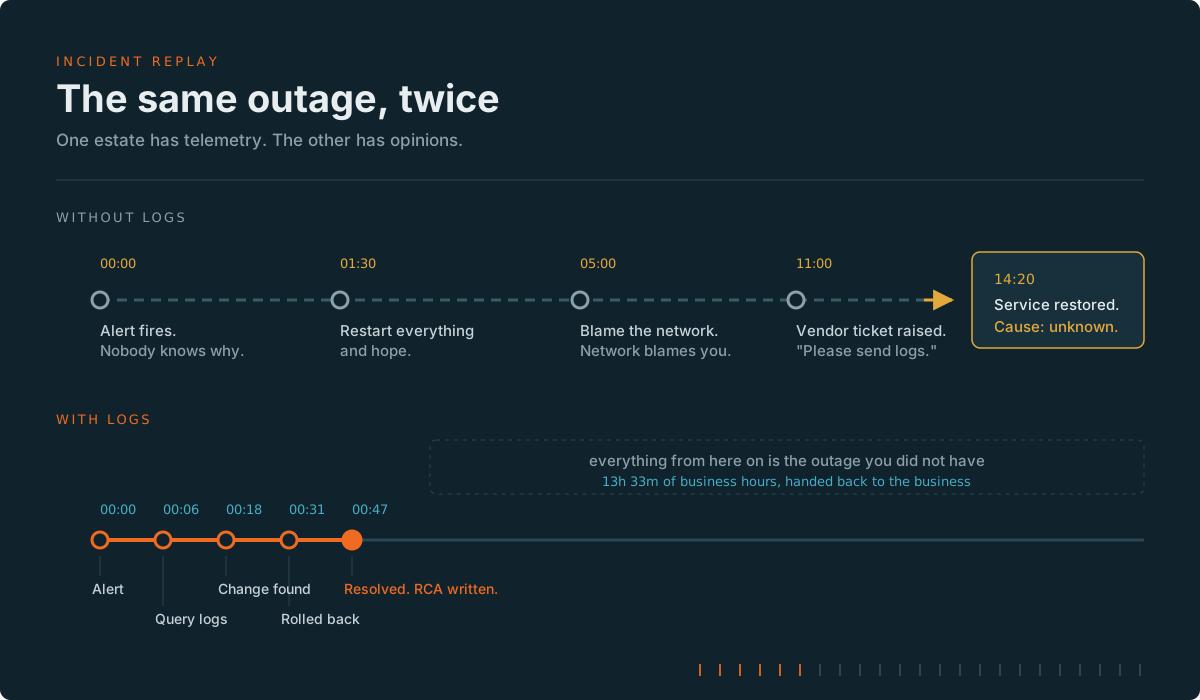
The version on the left of your P&L is a query. The version on the right is a war room, a vendor ticket, three people who’ve cancelled their evening, and a root cause analysis that quietly concludes “transient issue, monitoring in place” — which is corporate for we have absolutely no idea and we’re hoping it doesn’t do it again.
I’ve sat in both meetings. The second one is longer, and the biscuits are worse.
Why logging is always the first thing cut
Logging has a structural disadvantage in every budget conversation ever held: it is a cost centre that only pays out when things go wrong, and it pays out in a currency nobody measures.
Nobody gets promoted for the outage that didn’t happen. There’s no dashboard for “incidents resolved in forty minutes instead of fourteen hours”. There’s no line in the annual report for “breach scoped in two days rather than eight weeks”. The savings are real, substantial, and completely invisible.
The cost, meanwhile, is a number. It’s on an invoice. It has a meter name. It can be pointed at in a meeting by someone with a spreadsheet and a target.
This is not a fair fight.
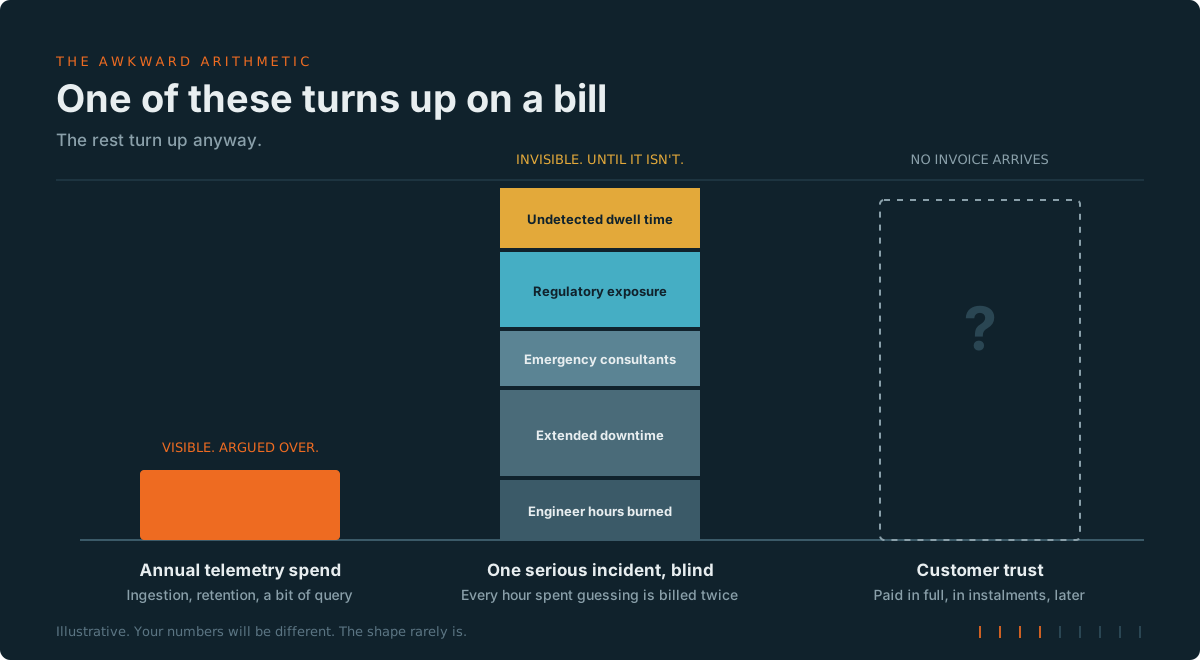
So the logs get trimmed. Retention drops from a year to thirty days. The verbose sources get switched off. And for eleven months, this looks like an extremely clever decision made by an extremely clever person.
What “a whole world of pain” actually looks like
It’s worth being specific, because “you’ll regret it” is not a business case.
The outage you can’t explain. You restore service by rebooting things until the symptoms stop. You never find out why. So you can’t prevent it, you can’t tell the customer anything credible, and it happens again in six weeks.
The breach you can’t scope. This is the expensive one. When something nasty gets in, the first question from every regulator, insurer, and customer is identical: what did they touch, and for how long? Without sign-in logs, network flow logs, and audit trails going back far enough, you cannot answer that. And when you can’t demonstrate the blast radius was small, you are obliged to assume — and disclose — that it was large. Your notification scope becomes “everyone”, because you’ve no evidence for anything narrower.
The audit you can’t pass. Retention requirements are usually written in years. Default workspace retention is thirty days. These two facts have ruined a great many otherwise pleasant Thursdays.
The change nobody made. My personal favourite. A configuration drifts, nobody owns up, and without an activity log you’re conducting an archaeology dig with a teaspoon. (For what it’s worth, the Azure Activity log is free to ingest — so this one is genuinely self-inflicted.)
The capacity decision you’re guessing at. Every “do we need to scale this?” conversation without historical telemetry is just seniority-weighted opinion.
Right, but it does cost money
It does. Let’s not pretend otherwise, because pretending is how you lose the argument in year two.
Log ingestion is billed by the gigabyte, and in a busy estate the gigabytes mount up with genuine enthusiasm. A chatty application, a verbose firewall, or a diagnostic setting somebody enabled “temporarily” in 2023 can quietly become one of your larger Azure line items.
And here’s the part that rarely gets said out loud: logging badly is worse than not logging at all. An indiscriminate “capture everything at the highest tier” approach produces an eye-watering bill, no meaningful improvement in your ability to answer questions, and — inevitably — a cost review that switches the whole lot off. The maximalists do more long-term damage to observability budgets than the sceptics ever have.
The goal isn’t more logs. It’s the right logs, in the right tier, for the right length of time.
How Azure actually helps with this
This is where the platform has genuinely improved. Azure Monitor stopped treating logs as a single undifferentiated blob some time ago, and the tooling now assumes you’ll want to make deliberate trade-offs.
1. Shape the data before you pay for it
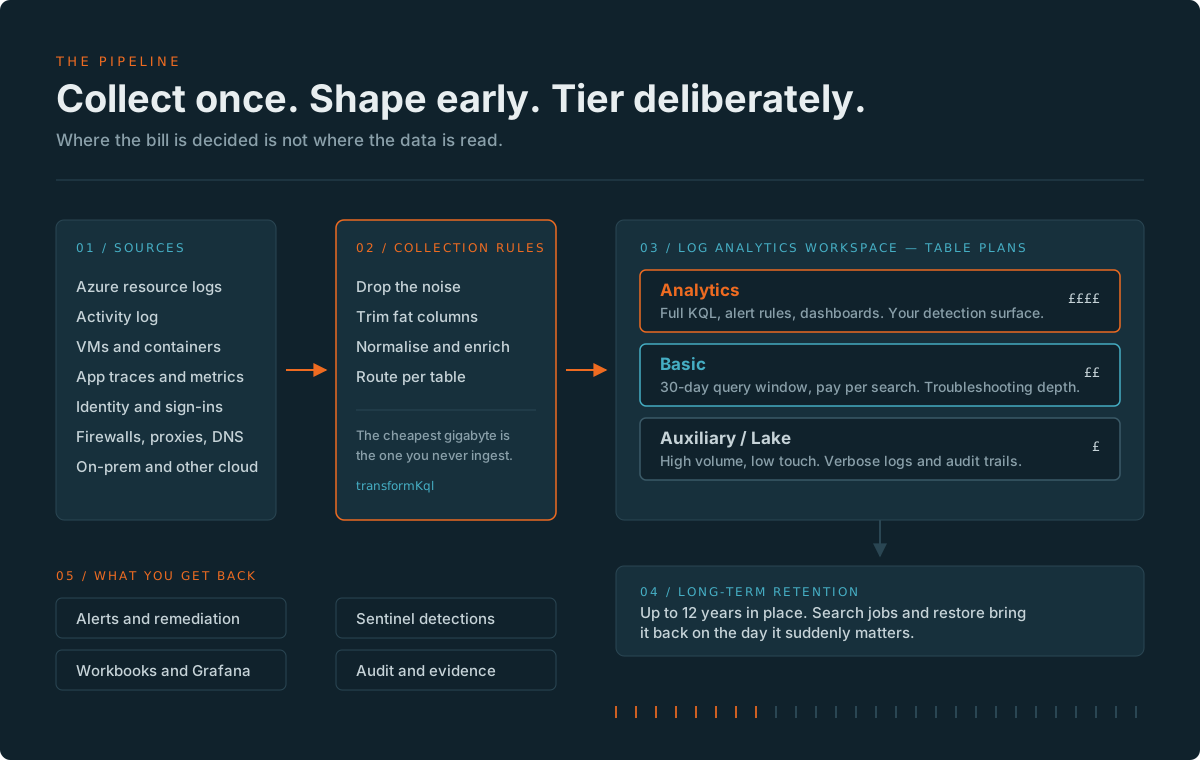
Data Collection Rules are the highest-leverage thing in the entire pipeline, and the most consistently ignored. A DCR transformation lets you filter rows and drop columns in the ingestion pipeline — before the meter runs.
Successful health-check pings you’ll never query. Debug-level chatter from a well-behaved service. That column containing a 4KB payload nobody has ever read. The cheapest gigabyte in your estate is the one that never lands.
2. Put each table in the tier it deserves
Log Analytics gives you three table plans, and the price difference between the ends of the range is roughly an order of magnitude or two — not a rounding error.
| Analytics | Basic | Auxiliary / Lake | |
|---|---|---|---|
| Ingestion cost | Highest | ~4–5x cheaper | ~40x+ cheaper |
| Query | Full KQL, no per-query charge | Per-GB scanned, single table | Per-GB scanned, single table, unoptimised |
| Query window | Full interactive retention | 30 days (search jobs beyond) | Full total retention |
| Alert rules | Yes | No | No |
| Best for | Detections, dashboards, anything you alert on | Troubleshooting depth you query occasionally | Verbose logs, audit trails, compliance evidence |
Interactive retention on Analytics tables includes the first 31 days in the ingestion price, extendable to two years. Total retention stretches to twelve years across the plans — long enough for most regulatory regimes and several changes of CISO.
Two things worth knowing that have landed recently: Auxiliary now covers a subset of standard Azure tables rather than just custom _CL ones, and you can switch tables between Analytics and Auxiliary in place, reversibly, without recreating them. That last point matters more than it sounds — it means trialling a cheaper tier is no longer a one-way door, which removes most of the reason people never got round to it.
3. Be honest about the trade-offs
Because I’d rather you heard this from me than from a query at 3am:
- Basic and Auxiliary queries are limited to a single table. No
join, nofind, no cross-resource queries.lookupandunionwork, within limits. - Auxiliary queries are unoptimised. They will be slower. Fine for a forensic trawl; useless for an interactive investigation.
- You can’t run alert rules on Basic or Auxiliary tables. Anything that needs to wake someone up belongs in Analytics.
- Auxiliary data isn’t covered by workspace replication, so it isn’t protected against a regional failure in the same way.
- You can’t purge personal data from Basic or Auxiliary tables — worth a conversation with whoever owns your privacy position before you route identity data there.
None of these are dealbreakers. All of them are the sort of thing you want to discover during design rather than during an incident.
4. Roll it up, then let it go cold
Summary rules aggregate verbose data into compact Analytics tables — so you keep the trend, the baseline, and the anomaly detection, without paying premium rates to keep every raw row hot. Then long-term retention holds the raw detail cheaply, with search jobs and restore to bring a specific window back when you need it.
If you’re running Microsoft Sentinel, the same philosophy applies at security scale: an analytics tier for real-time detection, mirrored into the data lake tier for long, cheap retention with billing based on a flat 6:1 compression assumption. Enabling Sentinel on a workspace also grants ninety days of interactive retention at no extra charge — so if you’ve got a blanket thirty-day policy applied across the estate, you may be paying to throw away two months of free data. I’ll wait while you go and check.
5. Find out where the money is actually going
Before optimising anything, look. This takes about four seconds:
Usage
| where TimeGenerated > ago(30d)
| where IsBillable == true
| summarize BillableGB = round(sum(Quantity) / 1000, 2) by DataType
| top 15 by BillableGB desc
In almost every environment I’ve looked at, two or three tables account for the overwhelming majority of the bill — and at least one of them is something nobody has queried in living memory. That table is not a reason to stop logging. It’s a reason to move it to Auxiliary, apply a transformation, and stop treating it like a detection source.
And while you’re there: AzureActivity, Heartbeat, Usage and Operation are free to ingest. If they’re switched off in the name of cost control, someone has been optimising in the dark.
A sensible starting position
If you take nothing else from this:
- Never lose the audit trail. Identity, activity, and administrative logs go to long-term retention. These are the ones that answer the questions that end careers.
- Alert-worthy data goes in Analytics. Everything you’d want to be woken up for.
- Everything verbose goes to Auxiliary. Firewall, proxy, DNS, flow logs. Keep it. Just don’t keep it at the premium rate.
- Transform at ingestion, not at query time. Filter and trim in the DCR.
- Govern retention with policy, not with good intentions. Azure Policy can audit and remediate retention settings across the estate. Good intentions cannot.
Summary : The bit that actually matters
Every organisation I’ve worked with that decided logging was too expensive eventually discovered its actual price — usually in a single unbudgeted week, at a rate several orders of magnitude worse than the invoice they were trying to avoid.
The telemetry bill is a known, controllable, tuneable number that you can optimise with an afternoon’s work. The cost of not having it is an unknown number, determined entirely by circumstances you don’t control, arriving on a date you don’t choose.
You are not paying to store logs. You are paying for the ability to answer a question you cannot yet imagine, on a day you are hoping never arrives.
Paint it orange. Bolt it in. Hope you never need it.
Further reading
- Azure Monitor Logs overview and table plans
- Manage data retention in a Log Analytics workspace
- Query data in Basic and Auxiliary tables — limitations
- Azure Monitor Logs cost calculations and options
- Manage data tiers and retention in Microsoft Sentinel
- Auxiliary Logs: Azure table support, plan switching and sovereign clouds
Pricing and feature detail move quickly. Check the Azure pricing calculator for your regions before committing to anything with a signature on it.